Instafest Spotify: How to Create Your Dream Music Festival From Your Playlist
You know what’s funny? We’ve all wondered what it would look like if our music taste got its own festival lineup. Like, imagine your top artists headlining a three-day event with your favorite indie band playing at sunset. Well, thanks to Instafest Spotify, that little fantasy isn’t just in your head anymore—it’s a real thing you can create in seconds.
And trust me, once you see your Instafest poster, you’ll want to share it everywhere.
What Is Instafest Spotify?
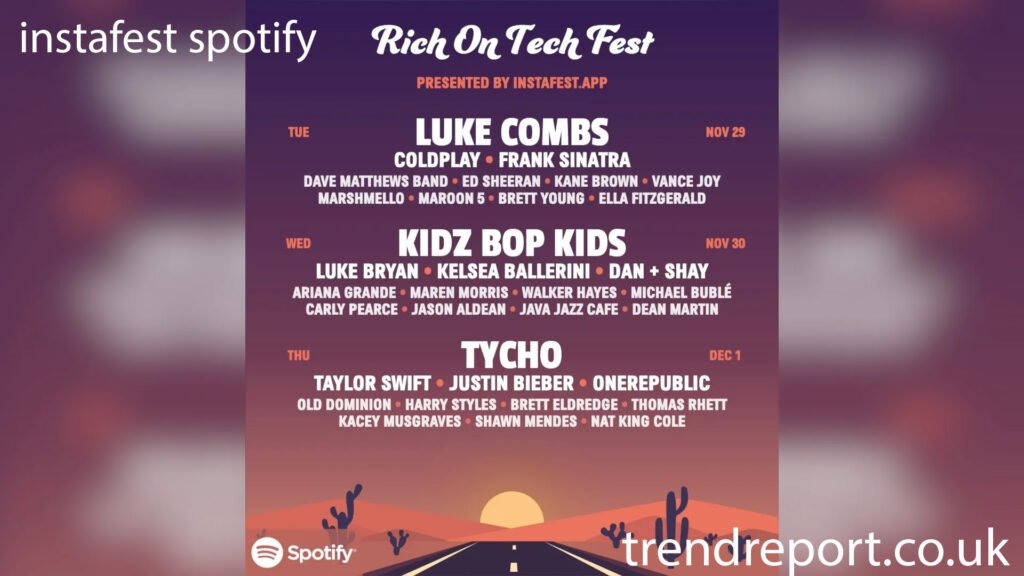
If you haven’t heard the buzz yet, Instafest is a fun third-party tool that turns your Spotify listening data into a custom festival lineup. Think of it as your personal Coachella poster—except it’s built entirely from the artists you actually love.
The best part? It looks just like a real music festival announcement, complete with dates, aesthetics, and headliners.
How It Works (In Simple Terms)
-
You log into the Instafest website using your Spotify account.
-
It analyzes your listening habits—top artists, favorite genres, the works.
-
In a few seconds, boom: your official festival poster appears.
It’s weirdly accurate too. You’ll see artists you forgot you were obsessed with, and others you definitely binge-listen to at 2 AM. (Don’t worry, we’ve all been there.)
Why People Love Instafest Spotify
Well, to be honest, it hits all the right notes—pun intended.
1. It’s Personal and Aesthetic
There’s something magical about seeing your music taste turned into art. Instafest posters look sleek, colorful, and totally Instagram-ready.
2. It’s a Great Conversation Starter
Share your lineup, and you instantly spark comments like:
-
“OMG, I didn’t know you listened to them.”
-
“Your festival looks way better than mine!”
-
“Why is my Instafest full of random artists I don’t even remember?”
3. You Can Customize the Vibe
Instafest lets you switch between:
-
Different themes (e.g., desert, sunset, pastel)
-
Time ranges (4 weeks, 6 months, all time)
-
Lineup styles
So if you only want your recent obsessions to show up, you can do that too.
How to Create Your Instafest Spotify Poster
Creating your custom festival poster is honestly easier than choosing what to binge-watch on Netflix.
Step-by-Step
-
Go to the Instafest website (search “Instafest Spotify” in your browser).
-
Log in using your Spotify account.
-
Allow permission (this is just for reading listening data).
-
Customize your poster with themes and time periods.
-
Download or share your festival lineup.
And that’s it. No app required, no complicated setup.
Tips to Make Your Instafest Poster Even Cooler
Want a poster that really pops? Try these:
Choose the Aesthetic That Matches Your Personality
-
Sunset themes for dreamy vibes
-
Desert themes for a bold, edgy look
-
Classic festival style for a realistic feel
Use “All Time” Listening Data
This gives you your most iconic lineup—artists you’ve loved for years.
Compare Posters With Friends
Seriously, it’s way more fun as a group activity. You’ll be shocked at how different everyone’s taste is.
Is Instafest Spotify Safe?
So, this is a fair question—after all, connecting your Spotify means giving access to your data.
Here’s what you should know:
-
Instafest only reads your listening statistics, not your playlists.
-
It cannot change or delete anything.
-
You can remove access anytime from your Spotify account settings.
Pretty straightforward.
Conclusion
Instafest Spotify is one of those rare tools that’s simple, fun, and genuinely personal. It turns your everyday music habits into something you can celebrate and share. And honestly, it’s a great reminder of how unique your taste really is.
So go make your poster, post it, and let your music festival dreams come to life—headliners and all.
FAQs About Instafest Spotify
1. Is Instafest free to use?
Yes! Instafest is completely free, and you can create unlimited posters without paying a cent.
2. Can I use Instafest without Spotify?
Currently, it’s designed specifically for Spotify users. Some alternatives exist for Apple Music, but Instafest itself focuses on Spotify.
3. Why are some artists missing from my Instafest lineup?
It depends on your selected time period and listening frequency. If you only heard an artist once or twice, they probably won’t show up.
4. Is Instafest safe for my Spotify account?
Yes, Instafest only reads your listening data and cannot modify your playlists or settings. You can revoke access anytime.