
User Experience Basics: A Friendly Guide to Designing Things People Actually Love
Introduction: Why UX Is More Than Just “Looking Good”
We’ve all been there. You open a website or app, excited to get something done, and within seconds… you’re frustrated. Buttons don’t make sense, pages take forever to load, and nothing feels intuitive. And honestly, that’s exactly where user experience basics come into play.
You know what’s interesting? Great user experience (often called UX) usually goes unnoticed. But bad UX? Oh, everyone feels it. So, if you’re building a website, an app, or even a digital product, understanding the fundamentals of user experience can make all the difference. Trust me, you’ll see why.
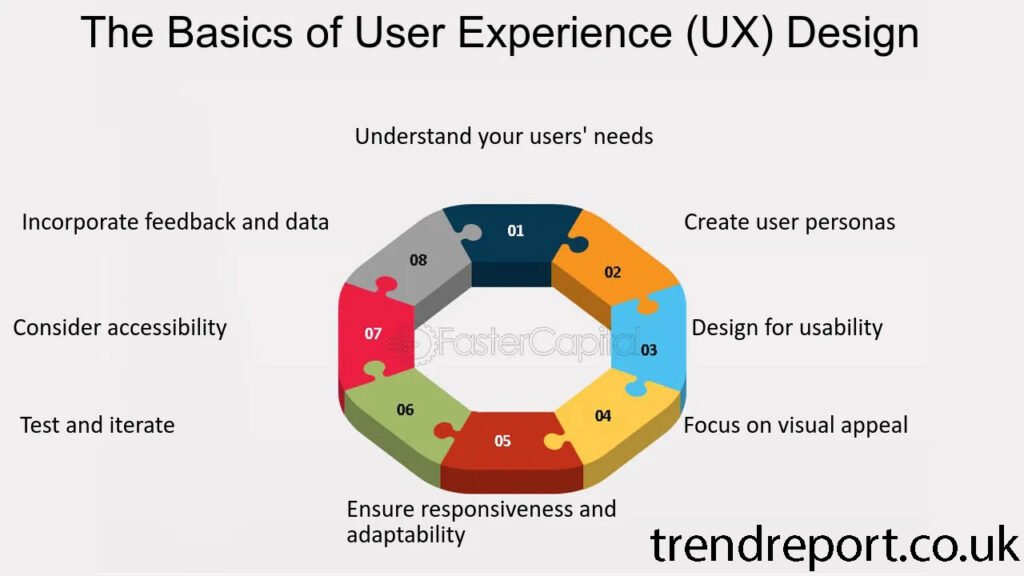
What Is User Experience, Really?
Understanding User Experience in Simple Terms
At its core, user experience is about how a person feels when interacting with a product. Not just how it looks, but how it works, how easy it feels, and how smoothly everything flows.
Think of UX like visiting a well-organized store. You find what you need quickly, signs guide you clearly, and checkout is effortless. That’s good UX. Now imagine the opposite. Yeah… not fun.
So when we talk about user experience basics, we’re talking about designing with real people in mind, not just screens.
UX vs UI: A Common Confusion
Let’s clear this up quickly:
-
UX (User Experience): How it feels to use something
-
UI (User Interface): How it looks on the screen
UI is part of UX, but UX goes deeper. A beautiful interface with confusing navigation still creates a poor user experience. And that’s something designers learn early when mastering user experience basics.
Why User Experience Basics Matter More Than Ever
First Impressions Are Everything
Well, to be honest, users decide fast. Like, really fast. Studies show people form an opinion about a website in seconds. If your experience feels confusing or slow, they’ll leave. No second chances.
Good UX:
-
Builds trust instantly
-
Keeps users engaged longer
-
Increases conversions naturally
And yes, search engines notice this too. That’s why user experience basics play a quiet but powerful role in SEO.
UX Is About Empathy, Not Perfection
Here’s the thing. UX isn’t about being fancy. It’s about being thoughtful.
When you focus on how users think, feel, and behave, you start making smarter design decisions. And suddenly, everything becomes clearer—from layouts to content structure.
Core Principles of User Experience Basics
Simplicity Always Wins
You know what users love? Clarity.
Simple navigation, clear labels, and obvious actions make people feel comfortable. If users have to “figure out” how something works, that’s already a problem.
UX tip:
If something doesn’t need to be there, remove it. Less clutter = better experience.
Consistency Builds Confidence
Buttons should behave the same way. Colors should mean the same thing everywhere. Fonts shouldn’t jump around randomly.
Consistency helps users feel in control. And feeling in control is a huge part of positive user experience basics.
Speed Is Part of the Experience
Slow-loading pages kill UX. Period.
Even a one-second delay can frustrate users. So optimize images, clean up code, and choose reliable hosting. Speed isn’t technical fluff—it’s a core UX principle.
Accessibility Is Not Optional
Good UX includes everyone.
That means readable text, proper contrast, keyboard navigation, and screen-reader-friendly layouts. When you design inclusively, you’re practicing user experience basics the right way.
Understanding Your Users (This Is Where UX Gets Real)
Research Before You Design
And yes, guessing is not a strategy.
User research helps you understand:
-
What users actually want
-
What problems they’re trying to solve
-
Where they get stuck
This doesn’t have to be complicated. Simple surveys, feedback forms, or observing real users can reveal powerful insights.
User Personas: Putting a Face to the User
Creating a user persona is like saying, “Okay, who am I really designing for?”
A persona includes:
-
Goals
-
Frustrations
-
Behavior patterns
Once you have this, your design decisions become much easier. That’s a key step in mastering user experience basics.
UX Design in Action: A Simple Example
Let’s say you’re designing a signup form.
Bad UX:
-
Too many fields
-
Confusing error messages
-
No explanation of why information is needed
Good UX:
-
Only essential fields
-
Clear instructions
-
Friendly error messages
See the difference? Same goal, totally different experience.
Common UX Mistakes to Avoid
Even with good intentions, mistakes happen. Here are a few to watch out for:
-
Ignoring mobile users
-
Using vague button text like “Click Here”
-
Overloading pages with information
-
Forgetting feedback (like confirmation messages)
Avoiding these helps strengthen your foundation in user experience basics.
Conclusion: Start Small, Think Human
user experience basics isn’t about trends or flashy designs. It’s about understanding people and making their journey easier. When you focus on clarity, empathy, and usability, everything else falls into place.